The Tenant Office agent
An agent that runs the busywork.
Residents, vendors and your team text it in plain words. Your staff ask it inside Tenant Office. It files the request, books the work, takes the rent and keeps everyone posted.
Every message is logged in your Tenant Office account, with a link to open it on the web.
The Free plan, for up to 100 active units and 3 outside owners, does not include texting.

 Work order 1042 · FixedJuniper Flats · Unit 404 · 3 texts, 2 photosOpen in Tenant Office
More than replies
It does the work, then shows you.
- 01
Understands plain words
No menus, no codes. People text the way they talk, with a photo if they have one.
- 02
Gets what it needs
It matches the phone to the right person and unit, and asks a follow-up when something is missing.
- 03
Checks before it acts
It says exactly what it is about to do and waits for a yes. A plain “yes” or “go ahead” is enough.
- 04
Does it and logs it
It saves the change, tells everyone who needs to know and links the record in your account.
Managers and staff
Manage from the sidewalk.
Your team texts the same number. Add a vendor, ask what is open, or hand off a job without opening a laptop.
- Share a contact card and say who they are. The agent sets them up.
- Ask “What’s still open at Elm Street?” or “Who owes more than $500?”
- Tell it what to send. It drafts, you confirm, it sends.


- Texted:LOLuis OrtegaOrtega Plumbing
- Texted:
Add Luis as our plumber for Juniper Flats and Elm St
- Assistant replied:
I’ll add Luis Ortega as a plumber for Juniper Flats and 12 Elm St and text him an intro. Go ahead?
- Texted:
Yes
- Assistant replied:
Done and logged in Tenant Office. Once Luis texts his insurance certificate, I’ll offer him jobs.
- Assistant linked the record:Vendor added · Luis Ortegaapp.tenantoffice.com/vendors/ortega-plumbing
Residents
Rent paid with one reply.
The reminder arrives by text. The resident says yes, the saved card is charged, and a receipt comes back.
- Pays with the card or bank account the resident already saved.
- Money goes straight to your account. Tenant Office takes no cut.
- Balance questions get an answer from the ledger, not a guess.


- Assistant replied:
Hi Maya, your November rent for Unit 404 at Juniper Flats is $1,850, due Saturday.
- Assistant replied:
Want me to pay it now with your Visa ending in 4242?
- Texted:
Yes, pay it
- Assistant replied:
Done. $1,850 paid with your Visa ending in 4242 and logged in your Tenant Office account.
- Assistant linked the record:Payment receipt · $1,850.00app.tenantoffice.com/resident/payments/nov-rent
- Texted:
Thank you!
Residents
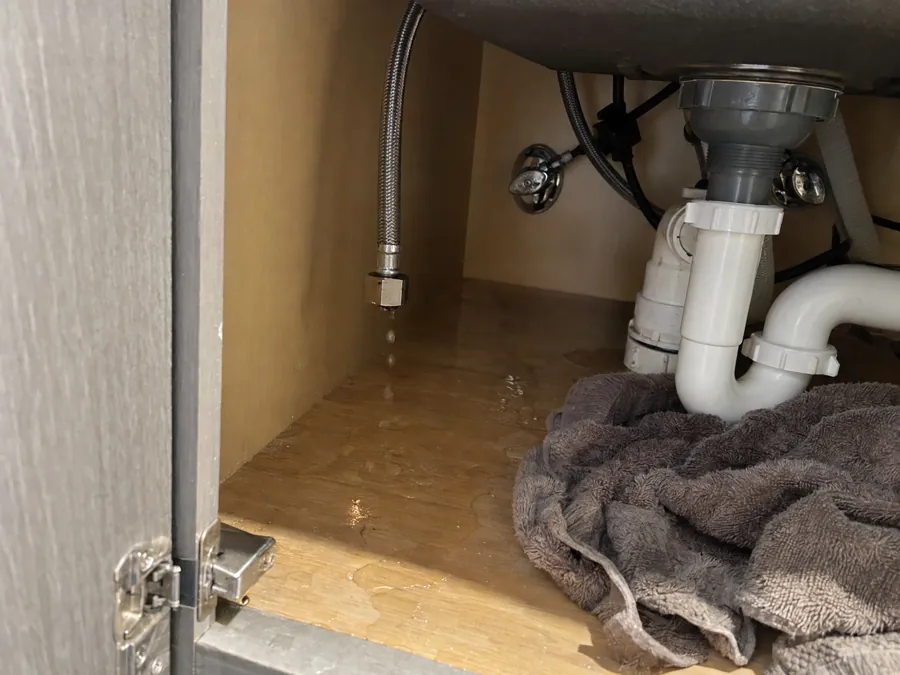
Repairs start with a photo.
A resident texts what is wrong. The agent opens the request for their unit, flags urgency, and keeps them posted.
- The photo goes on the work order, so your tech sees it before the visit.
- Visit times and updates come by text, no portal to check.
- Emergency words get safety guidance first, and your team is alerted.


- Texted:
- Texted:
Water is leaking under my kitchen sink
- Assistant replied:
Sorry about that, Maya. I’ll open an urgent repair for Unit 404 with your photo. Send it to the property team?
- Texted:
Yes please
- Assistant replied:
Sent and logged in Tenant Office. I’ll text you when a visit is booked.
- Assistant linked the record:Work order 1042 · Kitchen leakapp.tenantoffice.com/work-orders/1042
Vendors
Vendors close jobs from the truck.
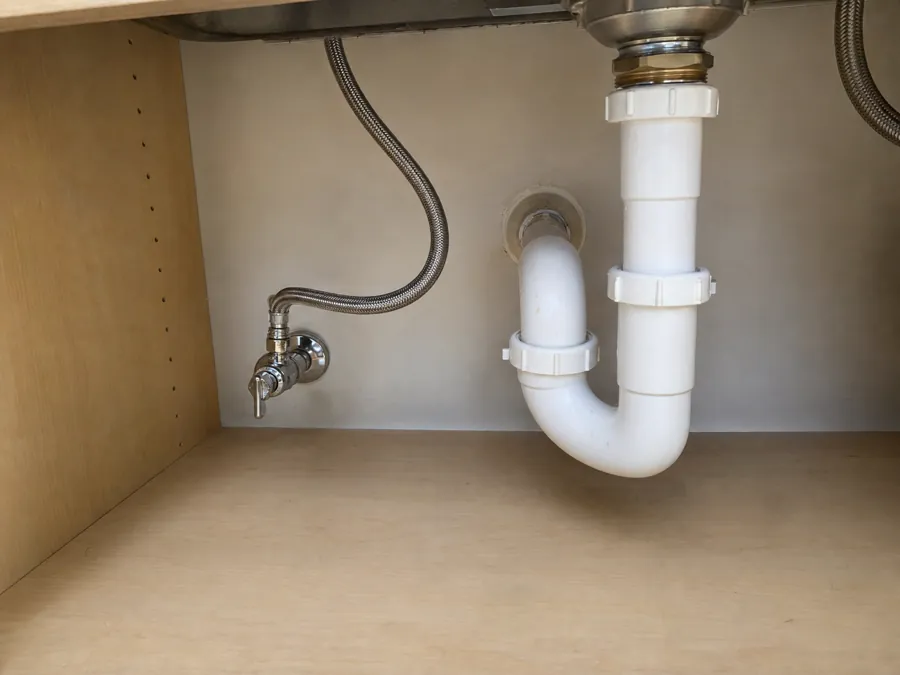
Jobs are offered by text. Vendors accept, send completion photos, and the work order moves to sign-off.
- No vendor login to remember. They reply to a text.
- Photos and notes attach to the right work order on their own.
- Insurance certificates by text, checked before jobs are offered.


- Assistant replied:
Hi Luis, you’re on the kitchen leak at Juniper Flats, Unit 404. Text me photos when the work is done.
- Texted:
- Texted:
All done. Replaced the supply line and checked for leaks
- Assistant replied:
Thanks Luis. Your photo is logged on work order 1042 and the team has it for sign-off.
- Assistant linked the record:Work order 1042 · Ready for sign-offapp.tenantoffice.com/work-orders/1042
In the web app
The same agent, beside every page.
Ask about your portfolio in plain words and get answers from your own records. Ask for a change and it shows you exactly what it will do.
- Answers link to the records they came from.
- Drafts work orders, assignments, follow-ups and resident messages.
- Nothing changes until you confirm it.
- Sees only what your role can see.

Ask the agent
- Asked:
Which work orders are waiting on a vendor?
- Agent answered:
Three are waiting. The oldest is the kitchen leak in Unit 404, waiting on Luis Ortega since Tuesday.
- Work order 1042
- Work order 1047
- Work order 1051
- Asked:
Give the dryer in 2B to Luis too, and let the resident know
- Agent proposed:
Ready to save
- Assign
- Work order 1047 · Luis Ortega
- Text resident
- Unit 2B · visit being booked
Logged in your account
Every text lands in Tenant Office.
Each conversation is saved on the resident, unit, vendor or work order it belongs to. The agent’s reply links to the record, so anyone can open it on the web app.
- Full message history on every record, with photos.
- A link in the text opens the record at app.tenantoffice.com.
- Your team sees what the agent did and why, in one activity feed.

Agent activity
- Opened work order 1042 for Unit 404 with photo7:49 AM
- Added Luis Ortega as plumber for 2 properties8:16 AM
- Recorded $1,850 rent payment for Unit 4049:03 AM
- Attached completion photo to work order 10422:41 PM
Owners too
Approvals in one reply.
When a repair needs the owner’s sign-off, the agent texts them the quote. They answer in their own words, and the job is booked.

Where the line is
It knows when a person should decide.
Some calls are yours. The agent gathers the context and hands them over.
- Replies come from software and never pose as a person.
- Emergency words get the fixed 911 guidance before anything else.
- Accommodation and fair-housing requests go straight to your team.
- It never decides screening, eligibility, rent or renewal outcomes.
- STOP always works, and it texts only phones that agreed.

MCP & API connectors
Connect ChatGPT, Claude, and Gemini to your portfolio.
Query live property and unit inventory directly from the workspace tools your team already uses, backed by Model Context Protocol (MCP) and OpenAPI 3.1.
- ChatGPT (MCP & Actions)
- Claude (Streamable HTTP MCP)
- Gemini (MCP & Tool Manifest)
- Read-only & property-scoped
Questions
No. Residents, vendors, owners and staff use the texting app already on their phone.
No. People write in their own words. When the agent needs a confirmation, a plain “yes” or “go ahead” is enough.
It matches the phone number to a resident, vendor, owner or team member in your account, and only acts on what that person is allowed to see and do.
Every text is logged on the matching record in your Tenant Office account, and the agent’s replies link to it on the web app.
Emergency words get the fixed 911 guidance first. The agent does not call 911 or dispatch anyone, and it alerts your team.
Resident payments are built on Stripe Connect and run in Stripe test mode today, so rent is still paid the way your property already collects it and recorded in Tenant Office. See Compliance for the current status of every workflow.

One agent for everyone.
The Free plan, for up to 100 active units and 3 outside owners, does not include texting.